


PRISM Live

Hot Novels






Install Tips
Mobile safety & integrity report for the latest package. We provide verifiable checksums and a timestamped scan summary. Latest package PRISM Live 5.0.2 scanned by multiple engines; no threats detectedas of Tue, 28 Jul 2026 12:10:22 GMT.
After downloading, use a system or third-party checksum tool to calculate the SHA256 and ensure it matches the value provided on this page (case-sensitive, without spaces).
Each engine uses different signature databases and heuristics, so results may vary slightly. We provide a timestamp and checksum to allow you to independently verify the package.
PRISM Live Review
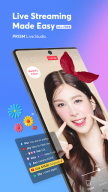
PRISM Live Studio is a live streaming tool app that supports camera live, game casting, and VTubing broadcasts. Enhance your streams with various effects, videos, images, and music to deliver a unique and engaging experience for your viewers.
[Main features]
• Choose Your Live Mode
Start your live broadcast with Camera, Screen, or VTuber modes. Stream using your smartphone camera, share your gameplay, or dive into VTubing.
• Screencast Broadcasts
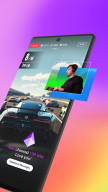
Share your mobile screen or gameplay with your viewers in real-time. We offer various options tailored for screen broadcasting.
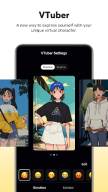
• VTuber Broadcasts
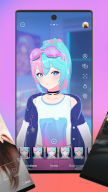
Begin your VTubing journey with just your smartphone! Use custom avatars or the 2D and 3D VRM avatars provided by the PRISM app.
• Login-Based Account Integration
Easily link your accounts to YouTube, Facebook, Twitch, and BAND with just a login.
• Real-Time Interaction with Viewers
Use the PRISM chat widget to seamlessly view and share viewer chats on your streaming screen. Highlight key messages to display them prominently.
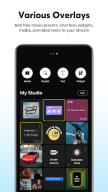
• Media Overlay
Enhance your broadcast with photos, videos, music, and playlists via My Studio, and share them with your audience.
• Web Widgets
Overlay web pages onto your live stream simply by entering a URL. Perfect for integrating support widgets.
• Beauty Effects
Our advanced beauty features automatically enhance your appearance for a natural, polished look.
• Animated Text Effects
Elevate your live streams with animated text themes including Title, Social, Caption, and Element for dynamic overlays.
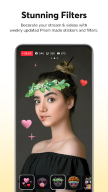
• Camera Effects
Add personality to your stream with fun masks, background filters, touch reactions, and emotion filters for more engaging broadcasts.
• Background Music
Choose from five unique music themes—Playful, Sentimental, Action, Beatdrop, and Retro—provided by the PRISM app.
• High-Quality Live Streaming in 1080p 60fps
Stream in high resolution with 1080p at 60fps. (Availability depends on your device and environment.)
• Multi-Channel Simulcasting
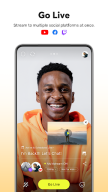
Stream your broadcast to multiple platforms simultaneously without extra network usage.
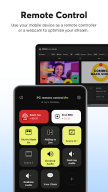
• CONNECT Mode with PRISM PC App
Seamlessly integrate PRISM mobile as a video and audio source for the PRISM PC app using a QR code scan.
• Camera Pro Features
Fine-tune your live stream with advanced camera settings like focus, exposure, ISO, white balance, and shutter speed.
• Camera Chroma Key
Unleash your creativity with the exclusive chroma key feature for more dynamic mobile broadcasts.
• AI Scripts
Leverage on-device AI to extract live broadcast scripts in various file formats.
• Background Streaming
Keep your live broadcast running smoothly, even during incoming calls or messages.
• Edit and Share Live Info in Real-Time
Update your live title and share your live link even while broadcasting.
• My Page
Review and share the history and video links of your past broadcasts directly from the PRISM app.
[Required permissions]
• Camera: Shoot a live stream or record for VOD.
• Mic: Record audio while shooting a video.
• Storage: Device storage may be used to save recorded videos and live streams, or to load stored videos.
• Notification: Permission required for the indication of information related to Live Streaming.
[Support]
• Website: https://prismlive.com
• Contact: prismlive@navercorp.com
• Medium: https://medium.com/prismlivestudio
• Discord:https://discord.com/invite/e2HsWnf48R
• Terms of Use: http://prismlive.com/en_us/policy/terms_content.html
• Privacy Policy: http://prismlive.com/en_us/policy/privacy_content.html
Additional information
Screenshots
Reviews
Recommend Article








Similar Apps

Subtitles & Captions for Videos. Create captions for all your video content.

Advanced video player with hardware acceleration and subtitle support.

SBS VR Player for Videos with 3D, Subtitles and HBS support. Just 0.2Mb in size.

High-performance video player supporting 8K playback and advanced tools.

Exploring Love Together

Play videos from cloud or offline folders.