


Tanglish : Tamil Keyboard

Hot Novels






Install Tips
Mobile safety & integrity report for the latest package. We provide verifiable checksums and a timestamped scan summary. Latest package Tanglish : Tamil Keyboard 145.5(155) scanned by multiple engines; no threats detectedas of Tue, 28 Jul 2026 12:13:42 GMT.
After downloading, use a system or third-party checksum tool to calculate the SHA256 and ensure it matches the value provided on this page (case-sensitive, without spaces).
Each engine uses different signature databases and heuristics, so results may vary slightly. We provide a timestamp and checksum to allow you to independently verify the package.
Tanglish : Tamil Keyboard Review

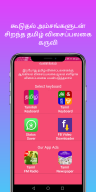
Tanglish: Tamil Keyboard is a feature-rich Android application designed to simplify typing in Tamil. Whether you want to write in the native Tamil script or use Roman Tamil, this app caters to all your needs. Perfect for bilingual communication, Tanglish allows users to transition smoothly between English and Tamil typing.
Instant English-to-Tamil Conversion Made Simple
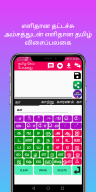
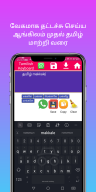
One of the standout features of Tanglish: Tamil Keyboard is its English-to-Tamil converter. With this tool, users can type messages in English and have them instantly translated into Tamil. This functionality is perfect for those who want to communicate effectively in their native language without struggling with manual transliteration.
User-Friendly Interface for Enhanced Communication
The app boasts a simple yet effective user interface, designed for quick and accurate typing. It features a phonetic keyboard that makes writing Tamil characters easier than ever. The larger font sizes are particularly helpful for elder users, ensuring convenience while typing.
Additional Features for Everyday Usage
Tanglish: Tamil Keyboard goes beyond standard typing tools by offering extra functionalities such as a status saver and video downloader. These features make it a versatile choice for users who are active on social media platforms or messaging apps. Now, you can save statuses or download videos directly from the app.
Developed by Rons Tech, this app combines innovation and usability to deliver an exceptional experience. Download Tanglish: Tamil Keyboard today and enjoy seamless communication in your preferred language.
Changelog
Aug 22, 2025
Tamil keyboard for writing Tamil Download the latest version of Tanglish : Tamil Keyboard 145.5 to enjoy new features and updates immediately!
* Tamil voice to text feature * Tamil Stickers added * New English to tamil keyboard * New auto suggestion while typing added * Save message option added * New single page keyboard layout * So easy to type tamil
FAQ
Additional information
Screenshots




Reviews
Recommend Article










Similar Apps

hero vpn - VPN to protect your online data

فیلتر شکن پرسرعت قوی هما 2025، فیلتر شکن پرسرعت قوی، فیلتر شکن قوی

Download Biohazard 4 APK (Resident Evil 4) for Android - Free - Latest Version

Cheto Aim Pool For Guidelines

Streamline workflows with rule-based network proxy tools.

Diff Browser is a lean and fast browser.