


NetMod VPN Client (V2Ray/SSH)

Hot Novels






Install Tips
Mobile safety & integrity report for the latest package. We provide verifiable checksums and a timestamped scan summary. Latest package NetMod VPN Client (V2Ray/SSH) 3.2.7 scanned by multiple engines; no threats detectedas of Tue, 28 Jul 2026 12:08:22 GMT.
After downloading, use a system or third-party checksum tool to calculate the SHA256 and ensure it matches the value provided on this page (case-sensitive, without spaces).
Each engine uses different signature databases and heuristics, so results may vary slightly. We provide a timestamp and checksum to allow you to independently verify the package.
NetMod VPN Client (V2Ray/SSH) Review
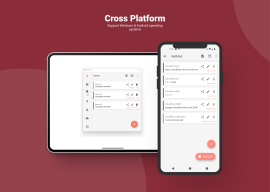
NetMod is a powerful and free VPN client equipped with an extensive suite of network tools, designed to give you full control over your online experience. Supporting a wide range of VPN protocols, including SSH, HTTP(S), Socks, VMess, VLess, Trojan, Shadowsocks, ShadowsocksR, WireGuard and DNSTT, it allows you to easily customize network traffic, bypass internet censorship, and maintain privacy online.
Among its key features, NetMod offers an SSH client for secure remote connections, and a V2Ray client based on the Xray core, providing flexibility and enhanced privacy. It includes SSH SlowDNS (DNSTT), enabling DNS tunneling to evade restrictions, and SSL/TLS tunneling to encrypt your data. You can also take advantage of proxy and VPN hotspot tethering, sharing your VPN connection effortlessly.
For advanced users, NetMod supports WebSocket, Cloudflare, and CloudFront tunneling for added security, while tunneling over VPN offers layered protection. It features an HTTP payload generator for creating and customizing payloads, as well as a host checker for troubleshooting connections. Multi-profile management makes it easy to switch between different VPN or SSH configurations, and the HTTP response replacer allows you to modify HTTP responses as needed.
Additionally, NetMod includes tools such as private configuration files for secure management, host-to-IP and IP-to-host conversion, and an IP lookup for retrieving detailed information about any IP address. The QR code generator and scanner simplify the sharing and importing of configuration files, while app-specific connection filtering gives you control over which apps use your VPN connection. For security experts, NetMod even offers penetration testing (pentest) capabilities to help identify network vulnerabilities.
With its combination of user-friendly design and advanced networking features, NetMod is a versatile tool suitable for both casual browsing and professional, security-focused tasks.
Changelog
- Added Response Replacer position in SSH
if you're experiencing SSH not connecting, try changing this option
- New "What's my IP" UI, added ipv6 info
- Added option resolve outbound domain externally in settings
- Fix Shadowsocksr dns leak
- Changed default tls fingerprint from "chrome" to "none"
- Fix root detection, open settings menu to trigger root request
Additional information
Screenshots






Reviews
Recommend Article










Similar Apps

Chromecast built-in for Android TV

Speedometer Pro is an application that shows your current speed but also a product that can help you turn your car into a modern vehicle

App to access the services of the PP.AA with the electronic identity card

VPN without limits and ads. TipTop VPN - fast and secure VPN proxy!

Every day is worth remembering...

Aviator, Crash, JetX, SpaceMan, GoRush, RoobetCrash Predictor