


Switch Access

Hot Novels






Install Tips
Mobile safety & integrity report for the latest package. We provide verifiable checksums and a timestamped scan summary. Latest package Switch Access 1.16.1.798952610(753) scanned by multiple engines; no threats detectedas of Tue, 28 Jul 2026 12:13:32 GMT.
After downloading, use a system or third-party checksum tool to calculate the SHA256 and ensure it matches the value provided on this page (case-sensitive, without spaces).
Each engine uses different signature databases and heuristics, so results may vary slightly. We provide a timestamp and checksum to allow you to independently verify the package.
Switch Access Review

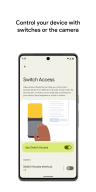
Switch Access, developed by Google LLC, is an innovative accessibility feature designed for Android devices running version 8.0 and above. It allows users to control their phones or tablets using external switches, on-device buttons, or even facial gestures via the front camera. This tool is particularly beneficial for individuals with motor impairments or those who face challenges interacting with touchscreens.
Enhanced Device Navigation Using Switches
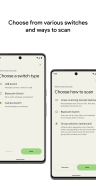
Switch Access provides multiple scanning methods to navigate your device easily. Users can choose linear scanning to move between items sequentially or opt for row-column scanning for faster selection. Advanced options like point scanning and group selection enable precise and efficient interaction with on-screen elements, catering to diverse user needs.
Facial Gesture Controls With Camera Switches
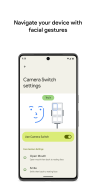
One standout feature of Switch Access is its ability to utilize the front camera for facial gesture controls. By simply smiling, raising eyebrows, or moving your eyes left, right, or up, you can browse apps, select items, and interact with your device hands-free. The app also includes customization options to adjust gesture sensitivity and duration for maximum comfort and usability.
Simplified Accessibility Menus for Everyday Tasks
Switch Access offers intuitive menus that make it easy to perform common actions such as scrolling, copying text, opening notifications, and adjusting volume settings. Once an item is selected on the screen, a menu provides all available interactions in one place, ensuring a seamless user experience.
Personalized Shortcuts for Complex Actions
For added convenience, users can record touch gestures—like pinching or swiping—and assign them to specific switches. These shortcuts allow quick execution of frequent or complex tasks with minimal effort. For instance, users can create gestures to turn ebook pages or zoom into content.
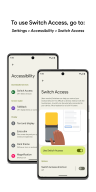
Switch Access integrates seamlessly into Android’s accessibility settings and supports various external devices like USB keyboards and Bluetooth switches. Download Switch Access today to enjoy a more accessible way of navigating your Android device.
Changelog
Jun 5, 2025
Control your device with switches or the front camera. Download the latest version of Switch Access 1.16.0.747675253 to enjoy new features and updates immediately!
This update includes bug fixes.
FAQ
Additional information
Screenshots
Reviews
Recommend Article











Similar Apps

Check out Telegram's latest features before anyone else

Voice screen lock helps protect and increase the security of your phone screen

Clone & isolate & freeze & hide apps with ease.

Automatic display mode matching to video frame rate for Nvidia Shield TV.

90 FPS + 120 FPS & IPAD VIEW For Any Device ( Android 15 Support )

Smart & Easy Arabic Keyboard