


Open Settings (shortcut to set

Hot Novels






Install Tips
Mobile safety & integrity report for the latest package. We provide verifiable checksums and a timestamped scan summary. Latest package Open Settings (shortcut to set 1.2(2) scanned by multiple engines; no threats detectedas of Tue, 28 Jul 2026 12:09:01 GMT.
After downloading, use a system or third-party checksum tool to calculate the SHA256 and ensure it matches the value provided on this page (case-sensitive, without spaces).
Each engine uses different signature databases and heuristics, so results may vary slightly. We provide a timestamp and checksum to allow you to independently verify the package.
Open Settings (shortcut to set Review

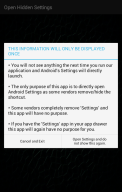
Open Settings (shortcut to set) is a productivity tool designed for Android users who need quick access to hidden or advanced system settings. This app is particularly useful on devices where manufacturers have removed or hidden the default Settings app icon. By providing an easy shortcut, Open Settings ensures users can directly navigate to Android's built-in settings without frustration.
Why Open Settings Matters for Android Users
Some device vendors intentionally hide or remove the link to access system settings, making it difficult for users to manage their preferences or troubleshoot issues. Open Settings solves this problem by acting as a reliable shortcut tool. Whether you're looking for developer options, network configurations, or other less-visible system features, this app streamlines navigation and saves valuable time.
Lightweight and Efficient Navigation Tool
Open Settings is a lightweight application designed solely for one purpose: opening the built-in Android settings menu. It does not consume excessive resources or add unnecessary features, focusing entirely on helping users simplify their workflows. For those who already have visible access to the 'Settings' app, this tool may not be necessary, but it's invaluable for devices with hidden menus.
When Open Settings May Not Work
While Open Settings supports most Android devices running version 3.2 and above, there are cases where it might not function due to vendor-specific restrictions or device limitations. If you encounter issues, this may be a result of your device’s custom interface preventing the app from executing its function properly.
Users seeking a straightforward solution to access essential system settings will find Open Settings an indispensable tool for daily use.
Changelog
Last updated on Jan 2, 2016
Opens Settings, for all devices where the vendor has removed the Settings icon Download the latest version of Open Settings (shortcut to set 1.2 to enjoy new features and updates immediately!
Minor bug fixes and improvements. Install or update to the newest version to check it out!
FAQ
Additional information
Screenshots

Reviews
Recommend Article










Similar Apps

Advanced AI assistant for smart, secure, and productive conversations.

MEGA is Cloud Storage with secure always-on privacy.

Scan phone storage and manage mobile phone junk files easily

Check for your assigned car and instructor without printing out the slip.

Triage notifications, review, comment, and merge, right from your mobile device

Effortless file management with cloud and device integration.