


MP3 Cutter and Ringtone Maker

Hot Novels






Install Tips
Mobile safety & integrity report for the latest package. We provide verifiable checksums and a timestamped scan summary. Latest package MP3 Cutter and Ringtone Maker 2.3.2 scanned by multiple engines; no threats detectedas of Tue, 28 Jul 2026 12:07:40 GMT.
After downloading, use a system or third-party checksum tool to calculate the SHA256 and ensure it matches the value provided on this page (case-sensitive, without spaces).
Each engine uses different signature databases and heuristics, so results may vary slightly. We provide a timestamp and checksum to allow you to independently verify the package.
MP3 Cutter and Ringtone Maker Review

Transform your favorite songs into unique ringtones, alarms, and notifications with MP3 Cutter & Ringtone Maker. Whether you want to cut, trim, merge, or mix music, this powerful audio editor gives you full control over your sound. Create high-quality, personalized tones and enjoy professional audio editing directly on your Android device.
Why MP3 Cutter & Ringtone Maker
Your music deserves to be heard your way. With MP3 Cutter & Ringtone Maker, you can:
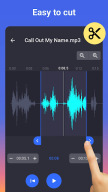
● Trim Music Precisely: Zoom waveforms, set start/end times, and cut audio down to the millisecond.
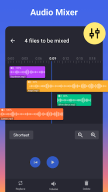
● Merge & Mix Tracks: Combine multiple songs or blend audio clips for a unique sound.
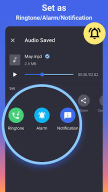
● Customize Ringtones: Assign specific tones for contacts, alarms, and notifications.
● High-Quality Output: Adjust bitrate (64kb/s–256kb/s) and volume for crystal-clear audio.
Key Features
Fast Audio Input & Cutting
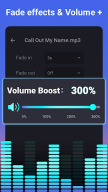
● Fade in/out effects for smooth transitions
● Millisecond-level trimming
● Supports mp3, wav, ogg, m4a, aac, flac, and more
● One-tap Start & End selection
● Inbuilt music player for previewing clips
Audio Editing & Output
● Edit audio name and convert formats (mp3, aac, etc.)
● Merge multiple audio files
● Mix tracks with the audio mixer
● Adjust bitrate and volume to create high-quality audio
● Customize ringtones for individual contacts
● Save as Ringtone, Alarm, Notification, or share
Efficient Ringtone Cutter
● Automatically detects all audio files on your device and SD card
● Waveform zoom for accurate editing
● Re-edit saved clips without waiting for current conversions
● All-in-one tone creator: mp3 cutter, ringtone maker, audio editor, audio trimmer, and notification tone creator
Permissions Explained
MP3 Cutter & Ringtone Maker requests:
● WRITE_EXTERNAL_STORAGE
● WRITE_CONTACTS
● WRITE_SETTINGS
These permissions allow you to assign ringtones to individual contacts. No personal data is collected.
How to Use
1. Choose a music clip from your phone or SD card.
2. Trim the desired section using waveform zoom or one-tap start/end.
3. Edit tags (Title, Format, Bitrate, Volume).
4. Save as Ringtone, Alarm, Notification, or Share.
Contact & Support
For feedback, suggestions, or help, contact: videostudio.feedback@gmail.com
Download MP3 Cutter & Ringtone Maker APK from APKDock to start creating your personalized ringtones today.
FAQ
Additional information
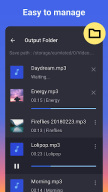
Screenshots


Reviews
Recommend Article









Similar Apps

Offline Tunes, Unlimited Vibes

search for your favorite music videos or watch videos that are trending
Boost bass, volume, and audio quality effortlessly.

Listen to radio online: more than 1000 Colombia radio stations. Radio FM and AM.

Easy to use Voice Recorder with high audio quality.

Listen to music for free, in slow networks while using less storage.