

PGT

Hot Novels






Install Tips
PGT Review
PGT is a launcher utility that can
change graphics
settings,
optimize fps
and
boost gaming
performance with unique features Potato graphics, Simple shaders etc
Featured on XDA Portal
You can
customize
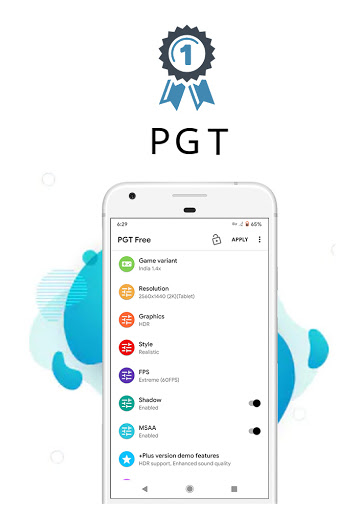
basic, miscellaneous, advance & experimental graphics Settings
Key features
• Supports all major Android OS (4.3 to 13+)
• Change resolution
• Apply HDR and UHD graphics in low end devices.
• Unlock all FPS levels( up to 90 FPS)
• Сustomize your shadows
• Enable Anti-aliasing
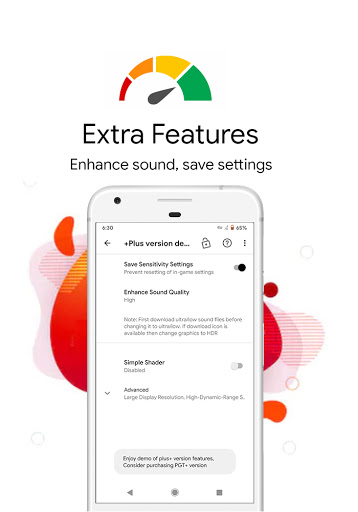
• Set Ultra Audio Quality
• Help & FAQ for useful tips
You can fully customize the game graphics to get beautiful pictures and smooth game play
All versions are supported: Global, CN, LITE, KR, VN, TW, BETA.
Please see screenshots for more info
Permission :
Storage for applying & backing up graphics settings.
Permission :
Internet for loading settings from our server.
Permission :
Kill background app for boosting memory
Disclaimer:Before using this app
Please make sure that you have read & accepted out Privacy policy & Terms of service
Privacy Policy: https://www.trilokiainc.com/free-privacy.html
Terms of Service: https://www.trilokiainc.com/tou.html
*All trademarked names and images are only used as references and we do not intend to violate or take ownership of these names and images, If you still feels that we have violated your intellectual property rights or any other agreement, please contact us by e-mail at trilokia.inc@gmail.com, we will immediately take the necessary measures.
Thanks
Additional information
Screenshots


Reviews
Recommend Article








Similar Apps

Phone Software Update Quick Checker helps you to keep your phone apps up to date

Android secret code for smart phone, mobile codes, with secret codes app

Easily evaluate the performance of Scandit's barcode and ID scanning SDK

Biblia del Cántaro revised by Cipriano Valera and published in the year 1602

MAI technology is used in facial recognition-based time and attendance systems

A React Native Paper example application